Almost every custom WordPress site I work on has different requirements. Some are company profiles, directories, or knowledge bases. Others are internal company sites with thousands of records.
But no matter the project type, I kept noticing the same pattern. Sooner or later, a client would ask, “Can we make the search a bit smarter?”
What’s interesting is that they never asked how I would build it. They didn’t care whether I used WP_Query, the WordPress REST API, or something else entirely. All they cared about was one thing.
If they couldn’t find what they were looking for, the search wasn’t working well enough. That’s when I started looking at search from a different angle.
TL;DR
- WordPress default search is still a solid choice for simple websites.
- Once a site starts using multiple Custom Post Types (CPTs), I tend to build my own Live Search.
- For me, the goal isn’t just faster search — it’s helping users find what they need more easily.
- You can try a real implementation on the Car Listing demo — click the search icon in the header, then type a keyword like “Tesla” or “Electric”.
WordPress Default Search Isn’t Actually Bad
If someone asks whether I always replace WordPress default search, the answer is no. For blogs, company profiles, or landing pages, I almost always stick with the built-in WordPress search.
The reason is simple. There isn’t that much content, the data structure is fairly straightforward, and users are usually just looking for a specific post or page.
In situations like that, I don’t see a reason to add complexity that isn’t needed. In my view, one mistake developers often make is reaching for new technology too quickly, when the built-in solution is already good enough.
Everything Changes When a Project Starts Using Custom Post Types
The shift became clear when I started working on projects that went beyond just Posts and Pages. For example, a site might have a structure like this:
- Portfolio
- Services
- Team
- Case Study
- FAQ
- Documentation
Or, like in a car marketplace project I built, vehicle data lives in a car Custom Post Type with separate taxonomies for make, year, location, and fuel type. From a developer’s perspective, that structure makes sense — each content type has its own place.
But from a user’s perspective, it’s all just information they expect to find through a single search box. They don’t think about whether something comes from a Post, a Custom Post Type, or a Custom Field.
All they know is: if it’s on the website, they should be able to find it. That’s when I started to understand that user expectations often don’t match how WordPress default search actually works.
What Clients Really Want Isn’t “Search”
Across many projects, I almost never got requests like, “Please use the WordPress REST API.” or, “The search needs to use AJAX.”
Clients don’t talk about technology. They describe things that are much simpler. For example,
- Results appear as they type.
- No page reloads.
- Everything on the site should be searchable.
- It should work well on mobile.
At first, I treated these as minor requests. But the more similar projects I took on, the more I realized clients weren’t really asking for a search feature.
They were asking for a faster, more comfortable way to find information. And in my experience, those are two very different things.
Why I Prefer Building Live Search
On recent projects, I’ve been building Live Search with the WordPress REST API more often. Not because WordPress default search is bad. But because I want more control over the user experience. With the REST API, I can decide:
- which content types to include in search,
- what information to display,
- how to order the results,
- when to send requests,
- and how the results dropdown should look.
I’m no longer locked into WordPress default behavior. Everything can be tailored to the project’s needs.
Case Study: Live Search on a Car Marketplace
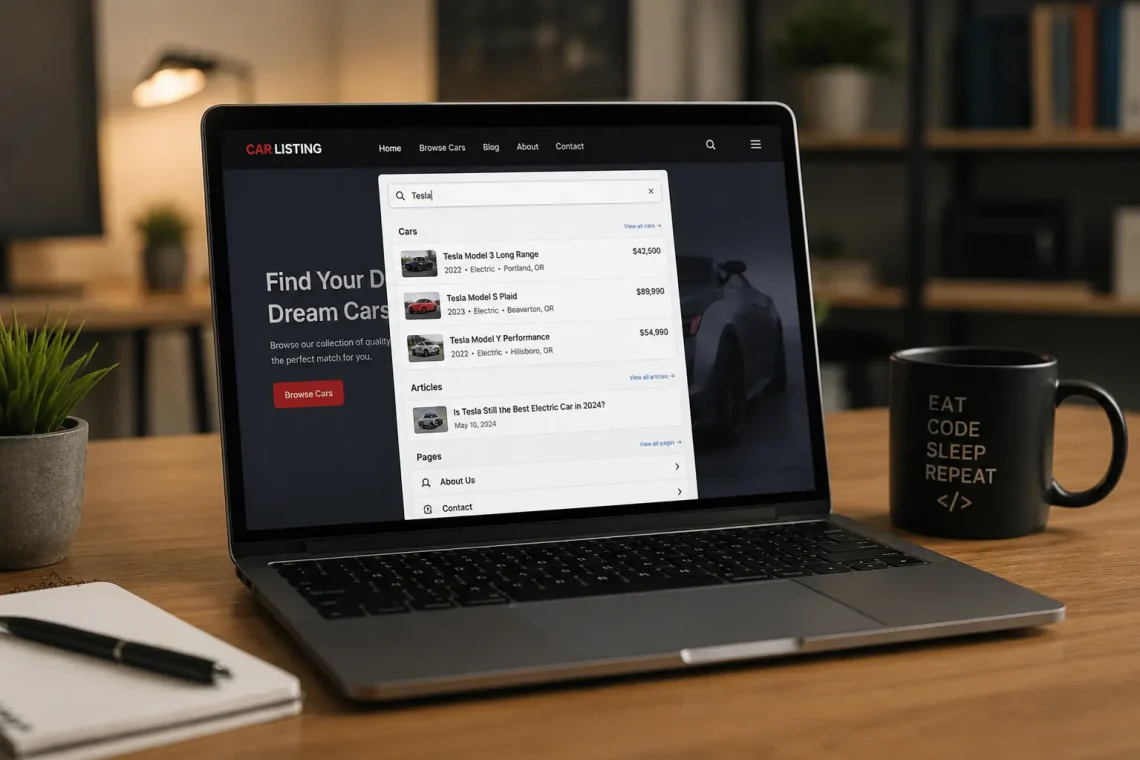
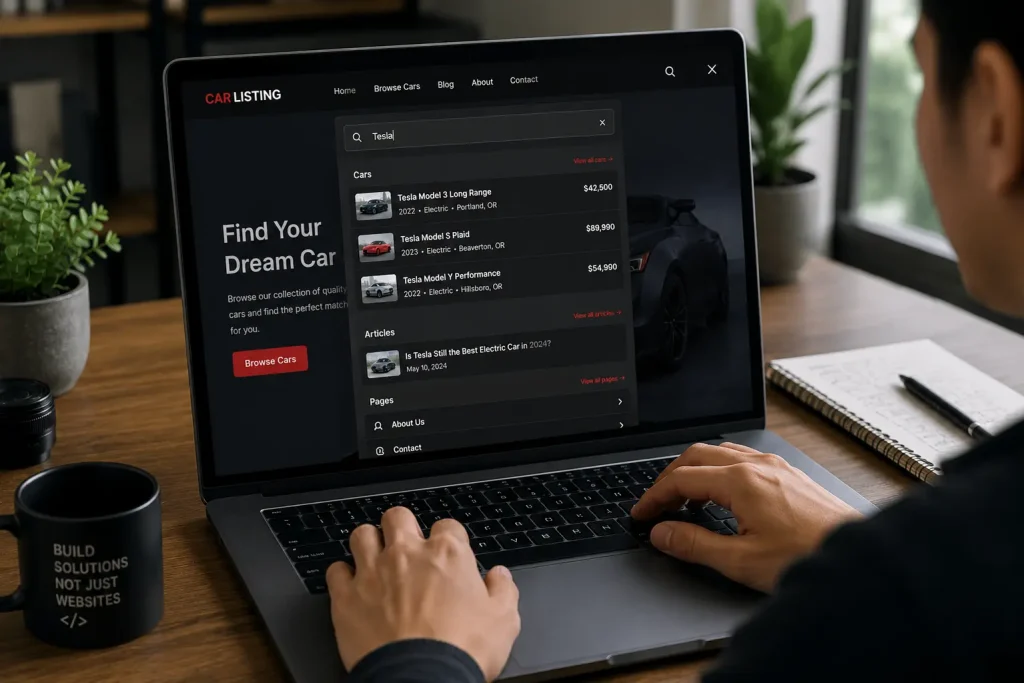
One implementation I’m especially proud of is the Live Search on Car Listing. The site is built as a vehicle catalog using the car Custom Post Type, with a sidebar filter for make, price, year, and location. Alongside those filters, I added a search icon in the header. When clicked, a search overlay opens — users can start typing without leaving the page.
Behind the scenes, I registered a custom REST API endpoint (/wp-json/rzwn/v1/live-search) that searches three sources at once:
- Custom Post Type
car— including taxonomies for make, year, location, and fuel type - Post — blog articles
- Page — static pages
Results are grouped by content type (Cars, Articles, Pages), showing a thumbnail, title, short excerpt, and price for vehicles. Requests are sent with a 300 ms debounce after the user stops typing, so the server isn’t overloaded.
Try it yourself: open the demo, click the search icon in the top-right of the header, then type “Tesla” or “Oregon”. Results appear in the overlay instantly — no page reload.
Approach Comparison
| Default Search | Live Search |
|---|---|
| Page reload | Results without reload |
| Results after submit | Results as the user types |
| Limited customization | Highly flexible |
| Good for simple sites | Good for custom sites with lots of data |
What I Like About This Approach
One of the biggest advantages is being able to build a search experience that feels modern. On the Car Listing demo, for example, after a few keystrokes users see:
- A vehicle or article thumbnail
- Title
- Content type (grouped: Cars, Articles, Pages)
- Short excerpt
- Price (for vehicles) or publish date (for articles)
- A link to the detail page
These details might seem small. But in my experience, changes like this make a real difference in how comfortable users feel browsing a site. Especially on sites with hundreds or even thousands of items.
Not Every Website Needs Live Search
Even though I build Live Search fairly often, I don’t use it on every project. If a site only has a handful of pages and a few blog posts, I still go with WordPress default search. Simpler. Easier to maintain. And more than enough.
Choosing technology, in my view, isn’t about picking the most advanced solution. It’s about picking the one that makes the most sense for the project.
When Do I Start Considering Live Search?
I usually start thinking about it when a project hits at least one of these conditions.
- It uses multiple Custom Post Types.
- It has hundreds to thousands of content items.
- Search is a primary feature of the site.
- Users search for data more often than they browse menus.
- The site works as a catalog, directory, or knowledge base.
When several of these start to show up, I almost always plan for Live Search from the beginning. Not because it’s cooler, but because the user experience is significantly better.
What I’ve Learned
If there’s one thing I’ve taken away from many WordPress projects, it’s this. Search isn’t just a small box in the header.
It’s one of the main ways users interact with everything on a website. The more complex the data structure we build, the more important the search experience becomes. So when I start designing a custom site, I don’t only think about how data will be stored.
I also think about how users will find it again. In my view, both matter equally.
Frequently Asked Questions
Does every WordPress site need Live Search?
No. For blogs, company profiles, or simple sites, default search is usually enough.
Does Live Search require a plugin?
Not necessarily. In the Car Listing case study, I built it directly into the custom theme using the WordPress REST API and a JavaScript module — no extra search plugin required.
Is there a demo I can try?
Yes. You can try it at cars.rizwanaritonang.com. Click the search icon in the header, type a keyword, and watch results appear in real time.
Is Live Search faster?
From a user experience standpoint, yes. Results can appear as users type without reloading the page.
When is the right time to start building Live Search?
I usually start considering it when a site has many Custom Post Types, or when search is one of the site’s primary features.
Closing
I used to think of search as a nice-to-have. As long as users could still find information, I figured that was good enough. But after working on more and more custom WordPress sites, my perspective changed. I started to see that search quality has a real impact on how users interact with a website.
That’s why I no longer default to built-in search on every new project. I look at the data structure first, how users will look for information, and how central search is to the site.
If the answer is “search will be used often“, I almost always choose to build Live Search myself. Not because the technology is more exciting, but because I want users to have an experience that feels faster, more relevant, and better matched to the site I’m building.