TL;DR
- I had never built a Chrome Extension before.
- The idea came from wanting to use HTML email templates directly in Gmail compose.
- I found a paid extension that almost fit my needs, then built a simpler version myself with AI.
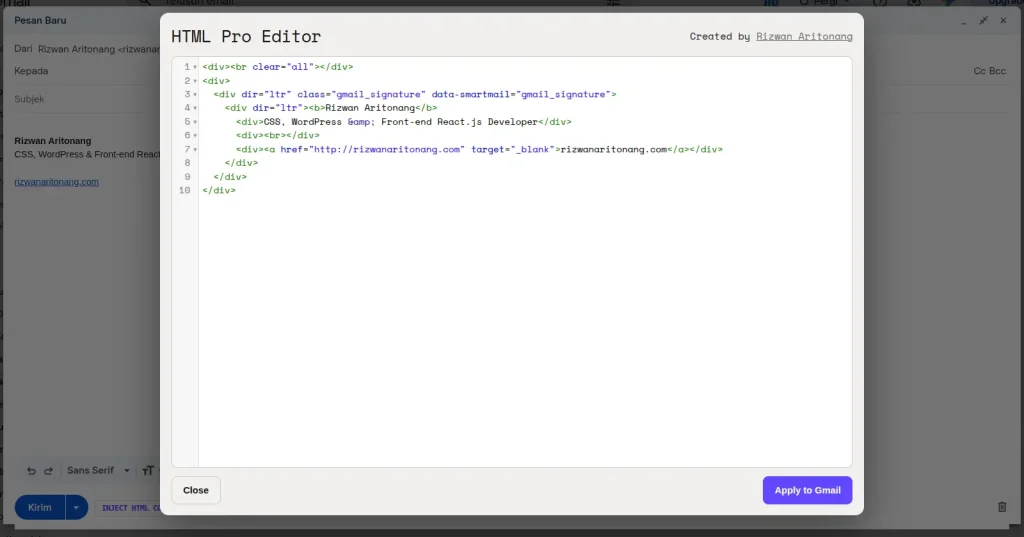
- The result: a button in the Gmail toolbar, an HTML editor modal, and HTML applied straight into the draft.
- This experience lowered the barrier for me to try technologies that were completely new.
There’s a habit I’ve picked up lately: looking closely at newsletters that land in my inbox. It’s not the content that catches my eye — it’s the design. Many of them look simple, not overloaded with color, not packed with images, with clean typography and comfortable spacing between elements. Altogether they feel professional.
I then wondered: if they can send emails like that, why can’t I?
This Idea Started from a Personal Need
I wasn’t looking for a new project idea. I simply wanted emails that looked cleaner when I messaged clients. My mental model was simple: build an HTML template once, reuse it whenever needed, without jumping to another tool.
After a few attempts, it became clear that Gmail doesn’t offer that out of the box. Gmail compose is fine for plain text, but options for inserting HTML email flexibly are limited.
I Started Looking for a Solution
I searched online, read articles, watched a few videos, and tried forum recommendations. Most solutions felt like overkill for what I needed. Some required third-party apps, some had long workflows, and some forced me to bounce between pages just to send one email. None of that fit my daily rhythm.
An Extension That Was Almost Perfect
In the middle of that search, I found a Chrome Extension called HTML Editor for Gmail.
My first impression was positive. It worked, the workflow was simple, and it almost matched what I needed. I used the trial for a few days and got used to the loop: open compose, paste HTML, apply it to the draft.
Until the Trial Ended
When the trial ended, a subscription option appeared — about five dollars a month. The amount wasn’t large. I wouldn’t mind paying if I truly needed it. But one question kept coming back: if the core feature is this simple, could I build my own version?
The Problem: I’d Never Built a Chrome Extension
I’d been building websites for a long time, I was comfortable with WordPress, and I often wrote custom functionality in PHP and JavaScript. But Chrome Extensions were territory I’d never touched. I didn’t understand the project structure, the Manifest, Content Scripts, or how an extension interacts with Gmail’s dynamic DOM.
If this idea had shown up a few years ago, I probably would have buried it. Not because the project was technically hard, but because the barrier to starting felt too high: read the docs, learn new concepts, then design a project structure I’d never seen before — all for one simple feature. It didn’t feel worth it.
This Time Was Different
Now I had AI — not just to generate code, but as a thinking partner. I didn’t ask it to build the entire project in one prompt. I started by explaining the problem I wanted to solve: the workflow I wanted, the user experience I expected, and the deliberately narrow feature scope.
Then we built it step by step. I set the direction, AI helped turn ideas into code, and I retested in Gmail after every change.
I Didn’t Start with Coding
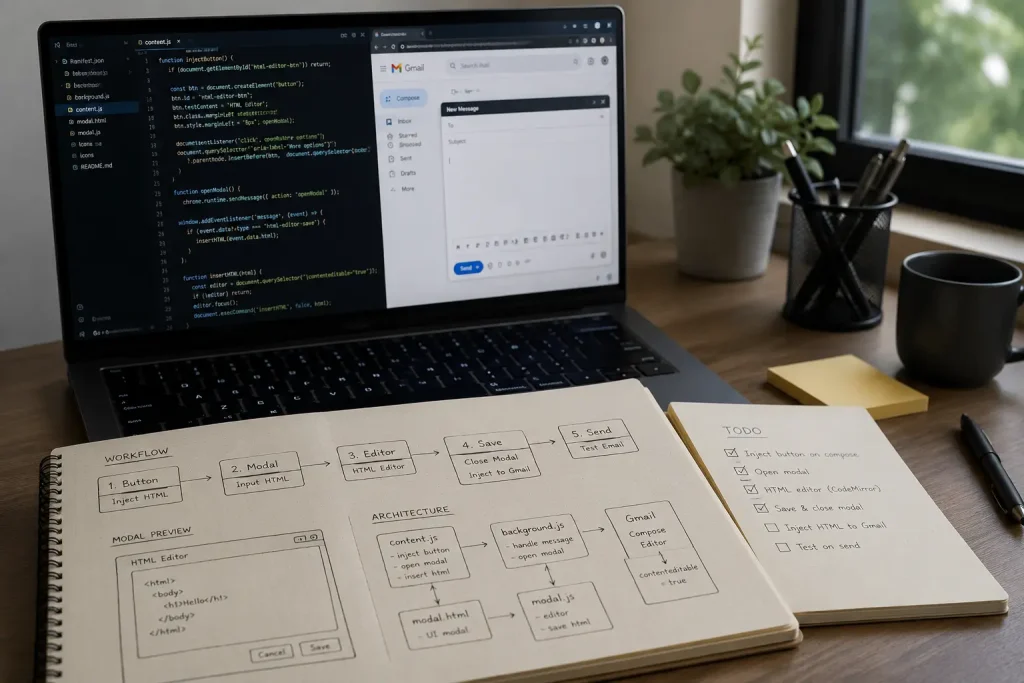
The first thing I did wasn’t opening VS Code — it was writing the workflow in my notes. I imagined how I’d use this extension every day, and I didn’t need dozens of features. I only needed what I’d actually use.
The final workflow was very simple:
- A new button appears on the Gmail compose page.
- That button opens an HTML editor modal.
- I paste the email HTML into the editor.
- I click Apply.
- The HTML lands directly in the draft I’m writing.
That simple.
I Didn’t Want to Clone the Existing Extension
My goal wasn’t to copy the paid extension I’d tried. I wanted a leaner version: enough for my needs, without features I’d rarely use. With that constraint, the project stayed small, easier to understand, and more enjoyable to build.
The result was a personal extension I named Pro HTML Editor for Gmail. Under the hood, the architecture isn’t complicated either: manifest.json uses Manifest V3, content.js injects a button into the Gmail compose toolbar, then opens editor.html inside a modal iframe. The editor uses CodeMirror so pasting HTML feels comfortable, and the result is sent back to the draft via postMessage. There’s also a simple safe mode that strips risky elements like script and iframe before the HTML is applied.
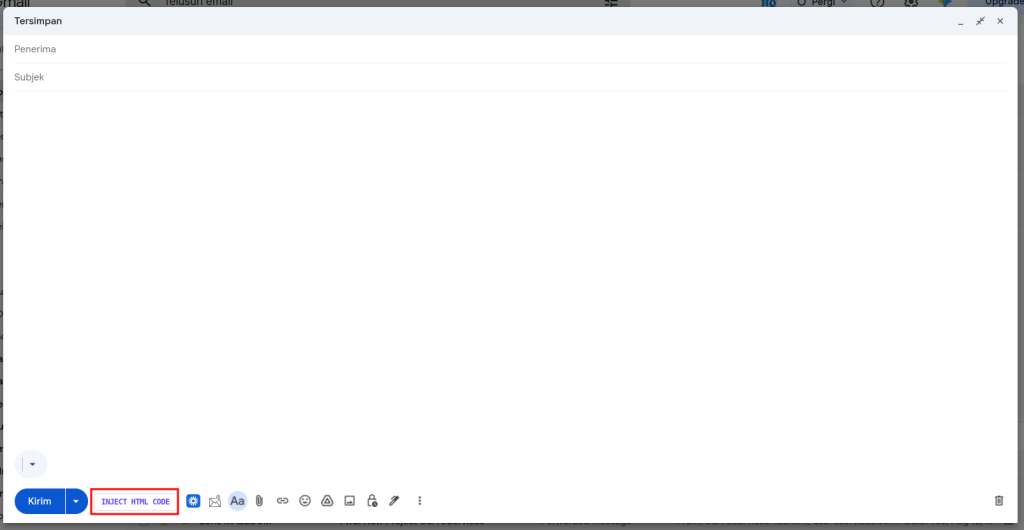
I got stuck on parts that sound trivial: finding the right Gmail toolbar selector, making sure the button doesn’t duplicate when a new compose window appears, and keeping HTML going into the active compose box. Gmail’s DOM keeps changing, so I also used a MutationObserver so the button still shows up on new compose windows. Ironically, those small details were where talking with AI felt most useful.
What Surprised Me Most
What surprised me most wasn’t writing the code itself. It was realizing I could understand a new technology much faster than I’d expected. Every time I hit a wall, I talked it through with AI. When there was an error, we hunted down the cause together. When one approach wasn’t right, we tried another.
It felt like pair programming. The difference was that my partner was AI.
Vibe Coding Changed How I Learn
I used to feel I had to understand all the theory before building anything. Now the pattern is reversed: I’d rather build first, then learn while improving. That approach makes learning more enjoyable. I’m no longer hesitant to try technologies that are completely new, because I know AI can help when I get stuck.
Closing
This project isn’t the most advanced Chrome Extension, and the features are intentionally simple. But for me it means something different: it’s the first Chrome Extension I’ve ever built. I started with no prior experience, then finished it through a mix of curiosity, a personal need, and AI help via vibe coding.
This experience made me more convinced that the biggest barrier to learning new technology is no longer a lack of information. The biggest barrier is the courage to start.




One comment on “My First Time Building a Chrome Extension with Vibe Coding”