Right now, I don’t want to pay for a VPS yet. What I wanted was simple: chat from Telegram, run the agent on my Ubuntu laptop, read my Obsidian vault, and help screen Upwork jobs. It sounded clean. On day one? Honestly, it wasn’t all clean.
Why I Started Doing This
As a web freelancer, my daily work repeats a lot: check Upwork, write proposals, note my agenda, sometimes do email outreach. Most of that already lives in my Obsidian vault, and that vault syncs to GitHub too.
I didn’t need an AI that’s great at chatting. I needed an AI that could help with real work:
- screen open Upwork jobs
- draft proposals based on my own parameters
- build a daily agenda from vault files
- later, outreach to potential websites
The stack I chose at the start:
- my own laptop
- Telegram as the remote control
- Gemini free tier as the brain
- Hermes Agent as the runtime
- Upwork MCP as the door into my Upwork account
- Obsidian vault as the source of truth
On paper, this was the most sensible combo to start without a monthly bill.
What I Thought Would Be Easy
I thought the hardest part was just “install Hermes, paste the API key, done.”
I underestimated a few things:
- BotFather commands are not automatically Hermes commands
- free-tier APIs burn fast when an agent reads many files and calls tools again and again
- cron needs a Telegram “home channel” before results can be delivered
Those small things made the setup take longer than I expected.
How I Connected Everything
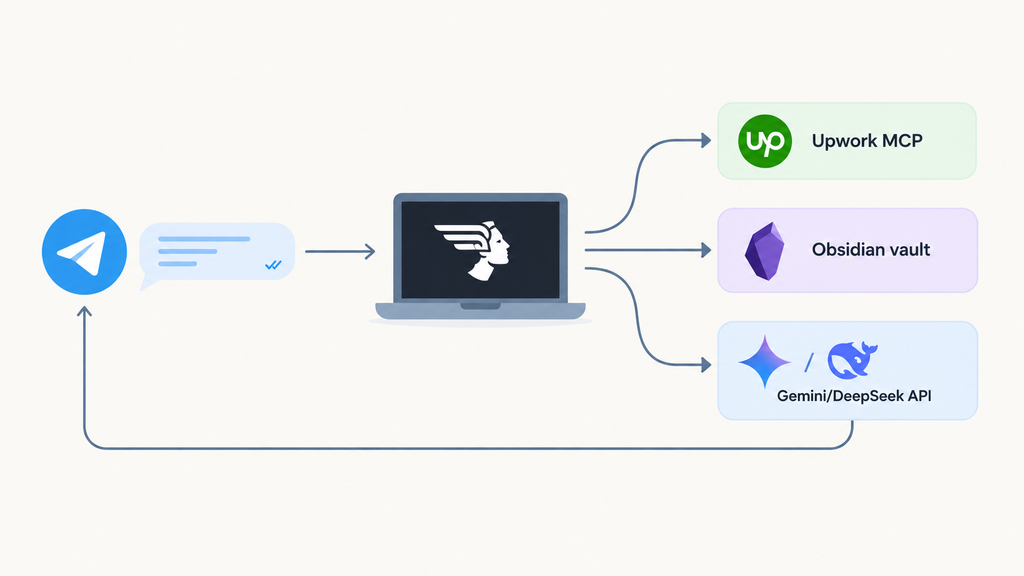
The flow that finally worked in my system looks roughly like this:
- I message the Telegram bot (
/upwork,/agenda, or/outreach) - The Hermes gateway on my laptop receives the command
- The related skill runs
- The agent reads vault files and/or calls Upwork MCP
- A short result gets sent back to Telegram
For Upwork, the draft goes to Telegram, then I copy it manually. That was the safety line I chose from the start.
These files became the “rule brain” for my agent:
- Upwork apply parameters
- old high-value proposal references
- portfolio
- outreach templates
- the current month’s daily agenda
So the agent isn’t guessing. It reads references I’ve used for years.
What Actually Confused Me
1) BotFather vs Hermes commands
I already set commands in BotFather:
/upwork/outreach/agenda
Then Telegram replied: unknown command.
The lesson was simple: BotFather’s menu is just UI. Hermes has its own command list. The skill name has to match. A skill named upwork-screening doesn’t become /upwork until I rename it to match.
2) Pairing code is not the bot token
I briefly thought the BotFather token was the pairing code. They’re different.
- Bot token → bot identity in
.env - Pairing code → short code after I DM the bot for the first time
Without pairing / an allowlist, the bot can stay silent or reject messages.
3) Separate Upwork OAuth
Upwork MCP was already logged in on Cursor. Hermes still asked me to log in separately (hermes mcp login upwork). The sessions don’t share.
4) Free tier feels “big” until you use an agent
I saw a 250,000 token limit and felt safe. One agent turn — reading files + MCP — can eat tens of thousands of input tokens. Add retries on 429 errors, and the daily quota disappears fast.
This was the most honest moment in the project: free tier is fine for testing, but an agent + tool-loop pattern is much more expensive than normal chat.
What I thought vs what happened:
- I thought setting commands in BotFather = it just works → Hermes has its own commands
- I thought Cursor MCP login works everywhere → Hermes needs separate OAuth
- I thought 250k tokens felt generous → one agent task can be very expensive
- I thought cron auto-sends results → you need
/sethomefirst
What Actually Helped
A few practical decisions that really helped:
Use /new before a new task
Old context is expensive. /new, then /agenda or /upwork, is much cheaper than one long chat that keeps stacking.
Split skills by command
I keep separate skills:
/upworkfor screening + proposal drafts/agendafor Obsidian daily agenda/outreachfor leads from a business map URL
One command, one job. Easier to debug.
Fallback models — don’t rely on one free tier
After Gemini kept hitting 429, I set a chain:
- Hermes free (Nous) as primary
- Gemini free as fallback
- DeepSeek (small top-up) as the next fallback
Every new message starts from primary again. So the system “rotates” when one hits a limit, without me switching models by hand every hour.
Keep a human in the loop for applying
Proposal drafts can be automatic. Submitting on Upwork stays manual. That lowers the risk of bad applies, and quality stays with me.
Would I Do It Again?
Yes — but with more realistic expectations.
If you just want to “play with AI chat,” this stack is overkill.
If you want a remote control for daily freelance work, it’s worth it.
What I’ll do next:
- tidy the skills so they use fewer tokens
- keep the Upwork cron on only when my laptop is awake and I’m ready to review drafts
- keep outreach + agenda as a daily habit, not a one-time experiment
If you’re a freelancer who already has an Obsidian vault and lives on Upwork, you don’t need a VPS on day one. A laptop + Telegram is enough for phase one — as long as you’re okay with a messy setup day.
Frequently Asked Questions
Do I need a VPS from the start?
No. I started on my own Ubuntu laptop. The trade-off: the agent dies when the laptop dies. For phase one, that’s still fine.
Can Upwork MCP auto-apply to jobs?
Technically there’s a write path, but I intentionally stop at a Telegram draft. Manual confirmation still matters.
Is Gemini free tier enough for a daily agent?
Enough for short tests. If the workflow has many tool calls, you’ll hit limits fast. Set up a fallback or a small budget.
Do BotFather commands work in Hermes automatically?
No. BotFather is just the menu. Hermes recognizes commands from its own registry/skills.
Does Cursor MCP login work in Hermes?
No. Hermes needs a separate OAuth/login for the same MCP server.
What’s the difference between a bot token and a pairing code?
The bot token from BotFather goes in .env. The pairing code appears when you first DM the bot, then you approve it in the terminal.
Conclusion
I’m not building a “perfect AI.” I’m building a remote control for work I already did manually: screening Upwork, drafting proposals, writing my agenda, and preparing outreach.
The most valuable part wasn’t the tool list. It was learning where my assumptions were wrong — about commands, auth, quotas, and safe limits when an agent touches a real freelance account.
If you want to try something similar, start with one command. Let one workflow truly work before you add a second.