TL;DR
- I already had a Chrome Extension to inject HTML into Gmail’s compose window.
- Marketing needs grew: I needed automated follow-ups (message 1 → 2 → 3) when a client doesn’t reply.
- I built my own app: Next.js, Supabase, Netlify, Gmail OAuth — with help from Cursor AI and an agent.
- The most maddening part:
- if my laptop or Mac goes offline, the cron schedule misfires and the follow-up becomes a brand-new email
- not the same email thread.
- if my laptop or Mac goes offline, the cron schedule misfires and the follow-up becomes a brand-new email
- not the same email thread.
- It eventually ran smoothly. What I learned: the problem is rarely in the “UI” — it’s usually in the invisible infrastructure.
I thought that once I could send clean HTML emails from Gmail, my outreach workflow was “good enough.” Turns out it wasn’t.
What was missing was the most tedious part: follow-ups. The first message is sent. The client hasn’t replied. Two days later I forget. A week later I’m embarrassed to reopen the same thread. On top of that, in my case follow-up messages are the key to email marketing.
That’s the point where I decided: if I needed automated follow-ups, I’d try to build my own.
Why I Didn’t Just Use a Paid Tool
I know there are already slick follow-up email tools out there, but besides being expensive, they felt like overkill for my scale, where the needs are still minimal.
My actual needs were fairly simple:
- Send message 1 on a schedule.
- If there’s no reply, send message 2 after a set delay.
- If there’s still no reply, send message 3.
- Just for my own Gmail account.
- No “has the email been opened” tracker.
- No bulk blast to thousands of recipients.
So paying for a big platform or email-marketing tool felt like renting a box truck to deliver a single small package.
This Idea Was Actually a Follow-On to a Previous Project
Earlier I’d built a Chrome Extension to inject HTML into Gmail’s compose window. That project came from a simple need: I wanted emails to look more professional without switching tools.
Once the extension was working, I started to see the next gap. The extension helped me write cleaner messages. But it didn’t help me remember to follow up.
So I wrote my ideal requirements in my notes:
- Message 1 — fill in the recipient, subject, HTML, then schedule the send.
- Message 2 — save it first; if there’s no reply within a certain time, send automatically.
- Message 3 — same as message 2, but referencing the previous message.
Looks simple. On paper, it’s always simple.
I Started with a Tech Stack I Already Knew
I didn’t want to learn new frameworks just for one workflow. So I picked what I already knew and had experience with, and that’s obviously easy to deploy:
- Next.js — dashboard UI
- Supabase — database + Edge Function for cron
- Netlify — to keep the dashboard online
- Google OAuth / Gmail API — send email through my Gmail account
Coding was assisted by Cursor AI and an agent. I directed the workflow, reviewed the UI, and tested. AI helped translate ideas into code, migrations, and bug fixes.
I deliberately limited features. No open/click tracking. No mass campaigns. The single focus: a 3-step follow-up sequence that genuinely works and stays simple.
The Final Workflow I Ended Up Using
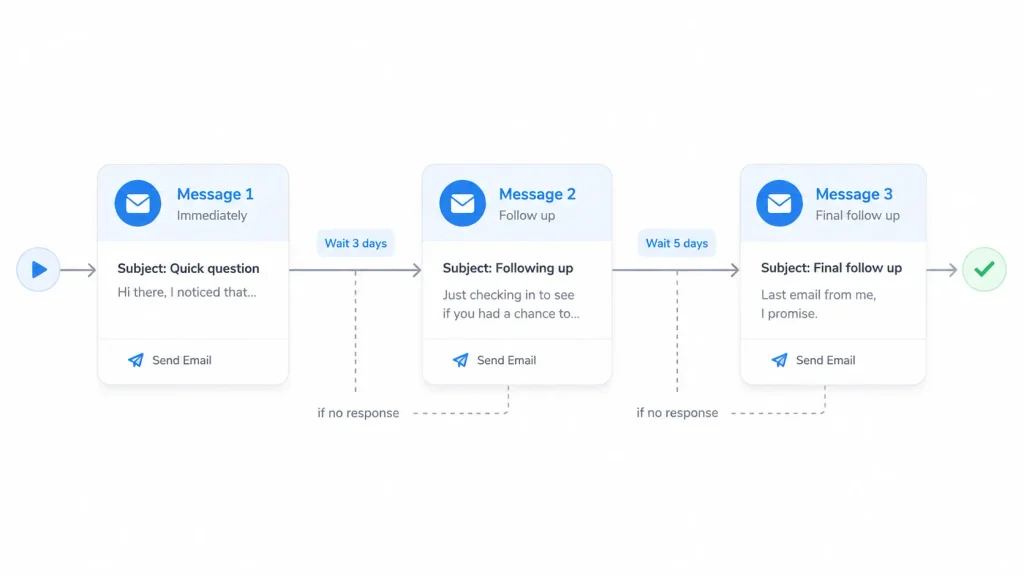
After a few iterations, the flow became this:
- Log into the app (only my email is allowed).
- Connect the Gmail API (send/read thread permissions).
- Create a sequence: recipient, subject, message 1 HTML, send schedule.
- Add messages 2 and 3 with delays (can be minutes, hours, or days).
- A cloud cron checks: is it time to send, and has the recipient replied?
- If they’ve replied, the next follow-up is cancelled.
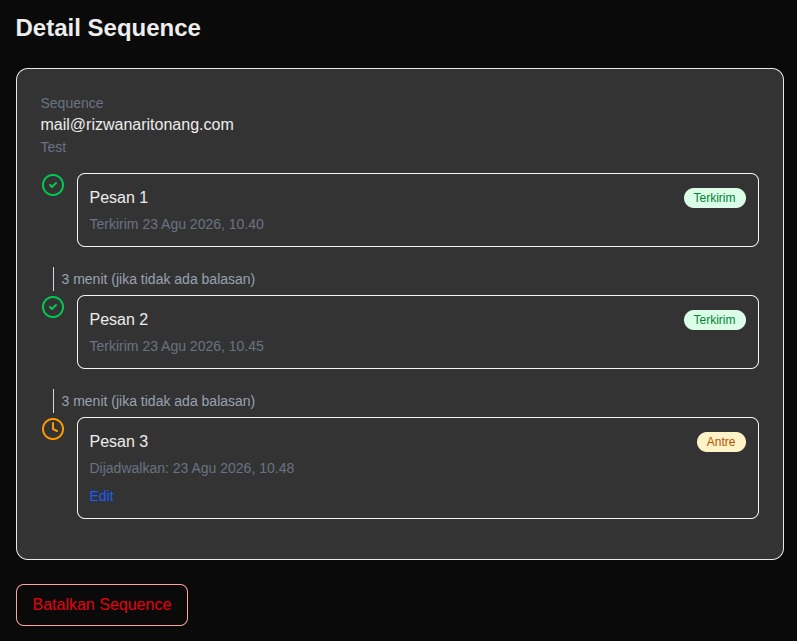
In the dashboard, I can see the status of each message: scheduled, queued, sent, cancelled, or done.
What I Thought Would Be Easy Turned Out to Be the Hardest
I assumed the biggest challenge would be the form UI and the HTML editor. It wasn’t.
What most often made me furrow my brow was the part you can’t see on screen:
1. Laptop off ≠ emails stop
I briefly assumed that if my Ubuntu/Mac laptop went offline, the automated sending would also stop. The logic made sense… until I realized: the UI can live on localhost, but the cron has to live in the cloud.
If the cron only runs while npm run dev is active, the follow-up will always depend on my laptop. That’s not automatic. That’s “automatic as long as I’m online.”
2. Schedule already passed, status still “Scheduled”
I ran a test: message 1 scheduled for 17:00. I came back at 20:00. Status still Scheduled.
Not because the send-email code was broken. The processor actually already supports catch-up: if scheduled_at has passed, the next cron run should send it immediately. The problem was the cron wasn’t being called correctly — or its frequency was too rare for a 30-minute delay.
3. A daily cron isn’t enough for minute-level delays
At first I thought a daily cron was “enough.” But if message 2 needs to go out 10 or 30 minutes after message 1, a once-a-day cron will obviously miss it.
I eventually moved to an every-5-minutes schedule. Only then did short delays start to make sense.
4. The pg_net extension and confusing SQL errors
I once saw errors like schema "net" does not exist and column "....token...." does not exist. It felt like the database was angry for no reason.
Then I understood: one problem was the extension not being enabled, the other was a token containing + / = characters that were mis-quoted in SQL. PostgreSQL reads a double-quoted string as a column name. The error sounds technical, but the root is trivial: quoting.
5. Follow-ups appearing as new emails
This was the most annoying from a product standpoint. Messages 2 and 3 should sit in the same thread as message 1. In the recipient’s inbox, they showed up as a brand-new conversation instead.
I’d already sent the threadId and an Re: ... subject. Turns out that wasn’t enough. Gmail is far more reliable at threading when there are In-Reply-To and References headers pointing to the previous message’s Message-ID.
After that, follow-ups finally felt like replies in the same conversation.
Quick Comparison: What I Imagined vs. What Happened
| What I imagined | What actually happened |
|---|---|
| Hard part is the form UI | Hard part is cron, OAuth, and threading |
| Deploy = runs automatically | Deploying the UI ≠ cron is active |
threadId alone is enough | Also needs In-Reply-To + References |
| Laptop off = emails stop | Emails can still run if cron is in the cloud |
| SQL error = big bug | Sometimes just quoting / extension not active |
This table might sound trivial. But that’s exactly where my biggest lesson was: a lot of “feature failures” are really “infrastructure wasn’t ready.”
What Actually Helped?
If I sum it up, the most helpful thing wasn’t a new library. It was more about how I worked:
- Limit scope first. I wrote down first what I would not build (tracker, bulk). That kept the project small.
- Separate the two kinds of auth. Dashboard login (who’s allowed to open the app) is different from the Gmail API connection (permission to send email). Mixing the two gets confusing.
- Test with short delays. For debugging, a 2–5 minute delay is far more useful than “3 days.”
- Have a manual trigger button/method. While the cron was unstable, being able to force the processor to run was very reassuring.
- Read status in the database, not just the UI. “Waiting” on screen can mean a
pendingthat never actually entered thequeuedstate. - Talk to AI like pair programming. I didn’t ask it to “build everything at once.” I described the symptom, shared screenshots, then asked for specific fixes.
Frequently Asked Questions
Do I have to use the Gmail API for automated follow-ups?
If you want it to run automatically when your laptop is off, in practice yes — or at least some cloud service that calls the Gmail API. Gmail’s native Schedule Send isn’t flexible enough for a follow-up sequence with reply detection.
Is vibe coding enough for a project like this?
Enough to start and move fast, but that doesn’t mean zero understanding. I still had to grasp the basics: OAuth, cron, status in the database, and the UI-vs-worker distinction. AI accelerates; it doesn’t replace decisions.
Do I need open tracking?
For my case, not yet. I care more about whether the recipient replies or not. Open tracking adds privacy and technical complexity I don’t need yet.
Closing

This project wasn’t born from a desire to “build an email-marketing SaaS.” It was born from my own laziness at forgetting follow-ups, and from the fact that in my case follow-ups matter for email outreach — and from curiosity: how far can AI go as a daily coding partner in development?
What I got wasn’t just an app that finally sends messages 1–2–3 correctly. I also gained a deeper understanding of automation: automation is easy in a demo, but hard in the details — especially in the parts you can’t see.
If you’re weighing whether to build a small tool for your own needs, I have simple advice: start from a workflow you actually use every week. Don’t start from the feature list on someone else’s landing page.
Build what you need. Let the rest wait until it actually gets in the way.


One comment on “I Needed Automated Follow-Up Emails, So I Built My Own with AI — Here’s What Happened”