A side project born from a daily habit. Ever since I subscribed to Notion, I’d been using it to build a database for tracking my cashflow. Over time, I wanted a faster, more “native” experience on my phone — without having to open Notion every time I needed to log income or expenses.
The Problem
I already had a cashflow tracking system in Notion that worked reasonably well. But for daily logging, the workflow still felt heavy:
- Opening Notion just to add a single transaction
- The database interface wasn’t comfortable for quick input on a phone
- No simple protection when opening my personal financial data
I wanted something much simpler: Open the app → log it → see the summary → done.
Why Existing Solutions Didn’t Work
I tried several existing finance-tracking apps. Many were good, but they didn’t fit the way I wanted to work.
Some common issues:
- Too many features I didn’t need
- The UI felt “heavy” for quick logging
- Often focused on complex budgeting rather than lightweight daily tracking
- Some required a cloud account, while I wanted my data to stay local
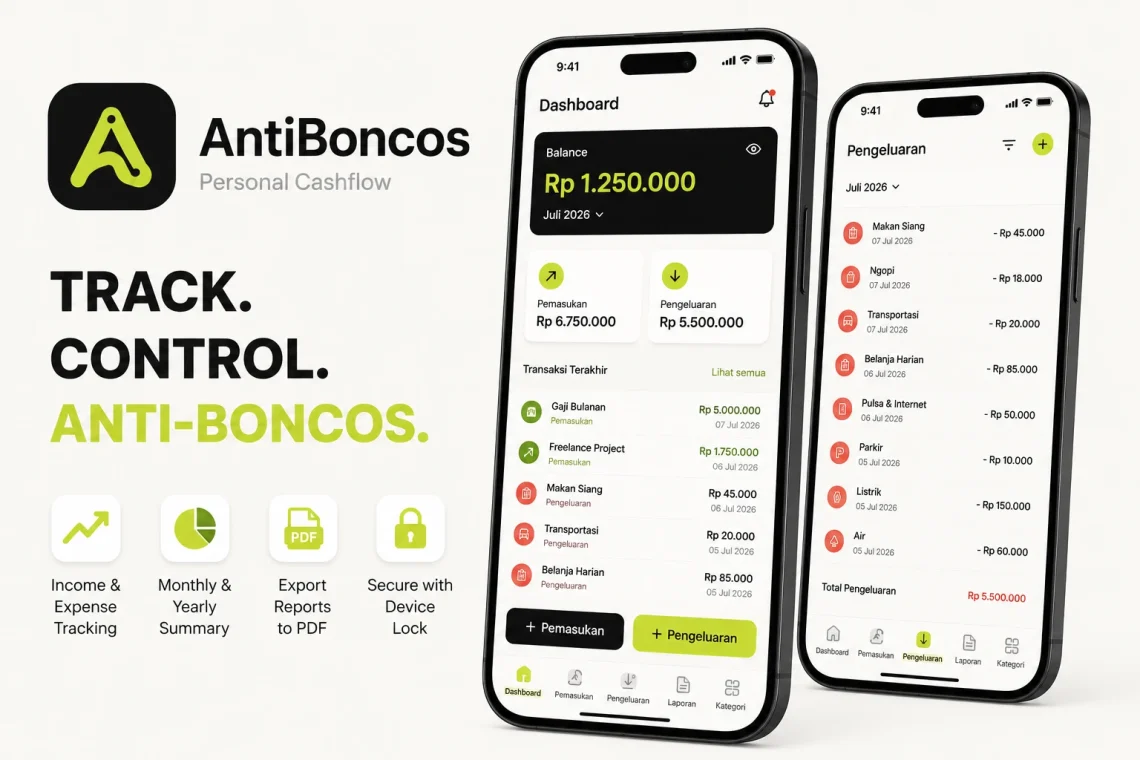
What I really needed was simple: Log income & expenses, generate reports, and secure it with the device lock.
Design Goals
Before writing any code, I set a few principles:
- Stay focused on personal cashflow, not become an all-in-one finance app
- The logging flow must be fast on mobile
- Monthly/yearly reports must be easy to export
- Simple security using the device’s screen lock / biometrics is enough
- Data is stored locally on the device
- Solve one problem well instead of piling on features
Development Journey
I have a background as a web developer and am pretty familiar with React. From there, building a mobile app with React Native / Expo felt like a natural next step.
The process roughly went like this:
- Map the core features that are truly needed
- Draft page wireframes with the help of ChatGPT
- Start vibe coding in Cursor AI to build the app
The features I locked in from the start:
- Log income and expenses
- Generate reports (PDF export)
- Simple security using device lock / biometrics
AI helped speed up exploration and implementation, but decisions about feature scope, screen flow, and what not to build were still mine to make.
Technical Challenges
Challenge 1 — Moving the habit from Notion to a mobile app
In Notion, the database flexibility is very high. In a mobile app, I had to commit to a stricter data structure to keep the app simple.
Solution
I designed a compact transaction model (type, category, amount, date, note) and focused on monthly summaries rather than an overly free-form database.
Challenge 2 — Making reports useful, not just a list of transactions
A plain transaction list isn’t enough. I needed a way to see summaries and export them.
Solution
I added a monthly summary on the dashboard, plus a PDF export feature for monthly or yearly reports.
Challenge 3 — Security without a complicated login system
Since this is a personal app holding financial data, I wanted protection — but without forcing an online account system.
Solution
I used an app lock based on device security (PIN/pattern/biometrics). Enough for personal use, without the complexity of cloud authentication.
Result
Once built, the main flow became:
- Open AntiBoncos
- Unlock with biometrics / device lock (if enabled)
- Log an income or expense
- View the summary on the dashboard
- Export a PDF report when needed
The app is currently not available on the Play Store, since its main focus is still personal use. That said, submitting it to the Play Store later isn’t out of the question.
Lessons Learned
This project reinforced that AI is not a replacement for developers.
AI helped speed up wireframing, scaffolding, and debugging. But understanding the real need, cutting unnecessary features, and designing a flow that’s comfortable for daily use still required human decisions.
For me, the combination of:
- a real personal pain point
- existing React knowledge
- ChatGPT for planning
- Cursor AI for vibe coding
made the learning and building process feel much faster than it would have been just a few years ago.
Closing
AntiBoncos wasn’t built to replace professional finance apps. Its goal was much simpler: to solve a small problem I ran into almost every day when tracking my personal cashflow.
For me, it’s a good example of how a habit of note-taking in Notion can evolve into a practical mobile app — one that eventually becomes part of a daily workflow.