Step-by-Step to Create Load More Posts with AJAX in WordPress Without Plugins [Case Study]

Load More Posts with AJAX in WordPress Without Plugins

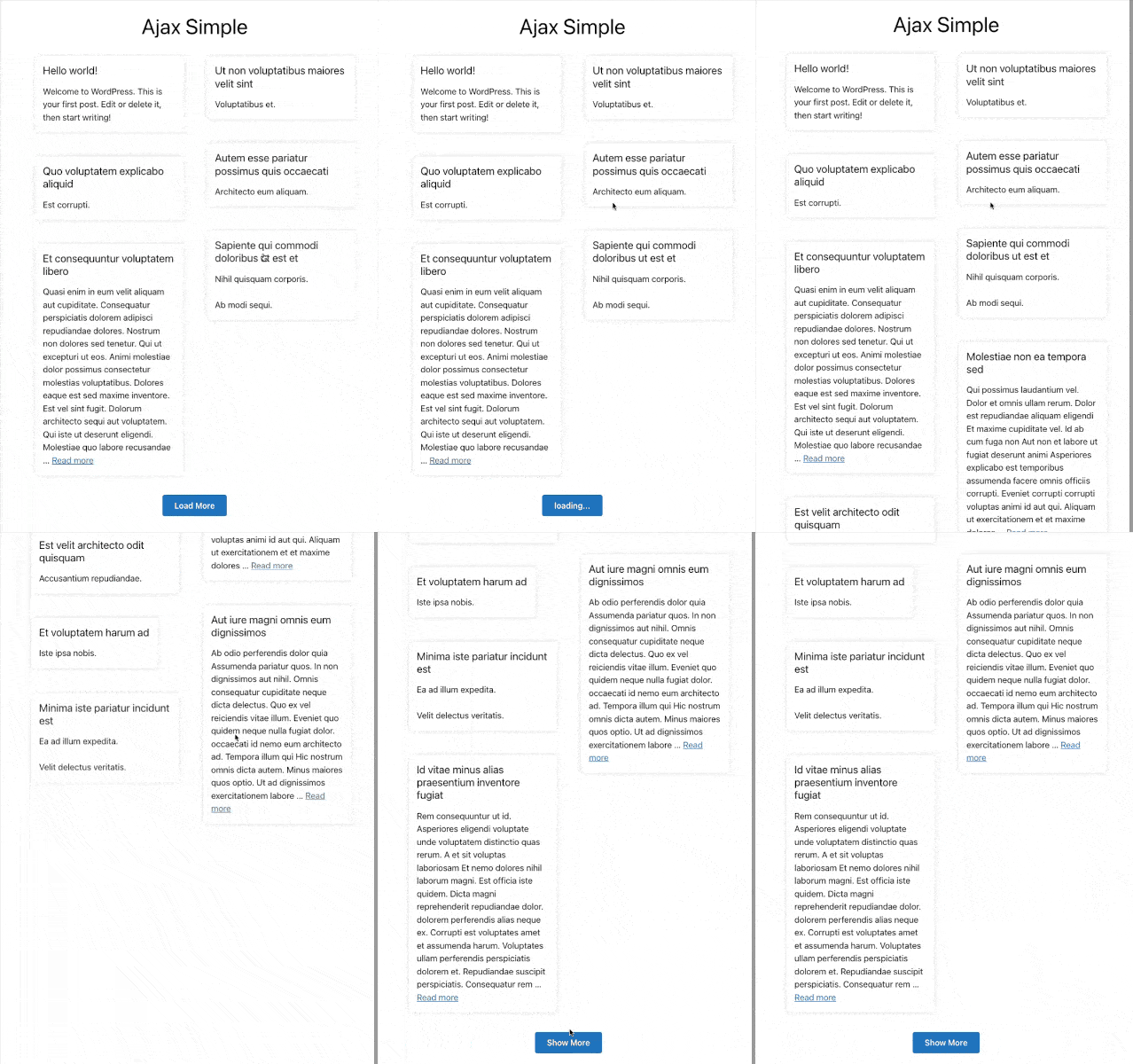
Load more posts with AJAX in WordPress can significantly enhance your site’s user experience by reducing page load times and creating a smoother browsing experience. In this comprehensive case study, I’ll walk you through the exact process I used to implement a custom load more posts functionality with isotope grid and smooth animations – all without relying on plugins.
Load more posts with Ajax in WordPress

Understanding the Benefits

Load more posts with AJAX in WordPress creates a better experience for visitors by allowing them to browse content without experiencing full page reloads. This technique I’m sharing was inspired by premium themes like Vara, which implement beautiful loading effects with isotope grid layouts.

Note: I’ve studied numerous premium themes and templates from client projects. These are invaluable resources for learning advanced web development techniques that you can adapt to your own projects.

Step 1: Setting Up Your Development Environment

Before implementing AJAX load more functionality, you’ll need the right development setup. Here’s what I used for this project:

Theme Selection

  1. GeneratePress as the parent theme
  2. GeneratePress child theme for customizations

Local Development Environment

  1. LocalWP for WordPress development
  2. Prepos for build tools and automation

Essential JavaScript Libraries

  1. Isotope for grid layouts
  2. Packery mode for improved layout options
  3. ImagesLoaded for handling image loading
  4. WOW for smooth animation effects

By setting up your environment properly from the start, you’ll avoid compatibility issues later in the development process.

Step 2: Creating a Custom Page Template

The foundation of our AJAX load more implementation is a custom page template. This approach gives you complete control over the output and functionality.

First, create a new file in your child theme folder named page-template-ajax-simple.php with the following header:

<?php
/* Template Name: Ajax Load More Posts */
if (!defined('ABSPATH')) {
    exit; // Exit if accessed directly.
}
get_header();
?>

Next, add the necessary CSS for animation and layout. While normally I’d recommend separating CSS into its own file, for faster development we’ll add it inline at the top of our template. Here’s a snippet of the animation styles:

<style>
    /* Animation keyframes - just a snippet */
    @keyframes rzwnFadeInUp {
        0% {
            opacity: 0;
            transform: translate3d(0, 40px, 0)
        }
        100% {
            opacity: 1;
            transform: none
        }
    }
    
    /* Basic animation classes */
    .wow { visibility: hidden; }
    .fadeInUp {
        animation-name: rzwnFadeInUp;
        animation-timing-function: cubic-bezier(.4, 0, .2, 1);
        animation-fill-mode: both;
        animation-duration: calc(.4s);
    }
    
    /* Core layout classes (partial) */
    .ajax__list {
        display: flex;
        flex-wrap: wrap;
        justify-content: center;
        max-width: 1200px;
        margin: 0 auto;
    }
    
    /* Additional styling would continue here... */
</style>

Step 3: Building the Custom Query and HTML Structure

Now we’ll create the WordPress query to fetch posts and set up the HTML structure for our grid. This code goes in your template file after the style section:

// Page structure with custom query - snippets only

<div <?php generate_do_attr('content'); ?>>
    <main <?php generate_do_attr('main'); ?>>
        <!-- Header section -->
        <article class="page frontpage">
            <div class="inside-article">
                <header class="entry-header" style="text-align: center;">
                    <h1 class="entry-title"><?php the_title() ?></h1>
                </header>
                
                <div class="entry-content">
                    <?php
                    // Animation setup - delay calculation
                    $rzwn_data_wow_delay = false;
                    $rzwn_data_wow_seconds = 0;
                    
                    // Query arguments for post retrieval
                    $args = array(
                        'post_type' => 'post',
                        'posts_per_page' => 6,
                        'paged' => $paged,
                        // Additional arguments would be here
                    );
                    
                    $ajax_query = new WP_Query($args);
                    
                    if ($ajax_query->have_posts()) : ?>
                    
                    <!-- Posts container with data attribute for AJAX -->
                    <div class="ajax__list" data-entries-source="<?php echo md5('ajax-list'); ?>">
                        <!-- Loop through posts with animation delay -->
                        <!-- Post card structure would be here -->
                    </div>
                    
                    <!-- Load more button appears only if we have more pages -->
           
                    <?php endif; wp_reset_postdata(); ?>
                </div>
            </div>
        </article>
    </main>
</div>
<?php get_footer(); ?>

Step 4: Styling the Posts Grid and Load More Button

We’ve already included basic styling in Step 2, but you may want to further customize the appearance to match your theme. The key CSS classes to focus on are:

  1. .ajax__list – The container for all posts
  2. .post-card – Individual post containers
  3. .post-card__inner – Inner post content wrapper
  4. .show-more__pagination-button – The load more button

The animation effects are powered by the WOW.js library and custom keyframes we defined. The fadeInUp class applies a smooth entrance animation to each post as it loads.

Step 5: Registering Required JavaScript Libraries

Now we need to register and enqueue all the JavaScript libraries our AJAX functionality depends on. Add this code to your theme’s functions.php file:

/**
 * Enqueue scripts for AJAX load more functionality
 * This is just a snippet of the script registration
 */
add_action('wp_enqueue_scripts', 'custom_ajax_scripts', 100);
function custom_ajax_scripts() {
    // Only load on our custom template
    if (is_page_template('page-template-ajax-simple.php')) {
        // Register WOW.js
        wp_enqueue_script(
            'wow-js',
            get_stylesheet_directory_uri() . '/assets/libs/js/wow.min.js',
            array('jquery'),
            '1.1.2',
            true
        );
        
        // Register other required libraries
        // ImagesLoaded, Isotope, Packery, etc.
        
        // Our custom AJAX script
        wp_enqueue_script(
            'ajax-load-more',
            get_stylesheet_directory_uri() . '/assets/js/ajax-simple.js',
            array('jquery'),
            '1.0',
            true
        );
    }
}

Make sure to create the necessary folders and files in your child theme. You’ll need to download these JavaScript libraries and place them in the /assets/libs/js/ directory.

Step 6: Implementing the AJAX Functionality

Now create a new file called ajax-simple.js in your /assets/js/ directory with the following code:

// Main AJAX functionality - snippet only
document.addEventListener("DOMContentLoaded", function () {
   (function ($) {
        "use strict"
        
        $(window).on("load", function () {
            // Initialize animation
            var wow = new WOW()
            wow.init()
            
            // Setup grid reference
            var $masonry = $(".ajax__list")
            
            /**
             * Core AJAX load more function - simplified snippet
             */
            function loadMorePost($button) {
                var this_wrapper = $button.parent().siblings(".ajax__list")
                
                // Create data object for AJAX
                var data = {
                    exclude: []
                }
                
                // Get existing post IDs to exclude from next request
                // Isotope methods would collect these IDs
                
                // AJAX request snippet
                jQuery.ajax({
                    type: "GET",
                    url: window.location.href,
                    data: data,
                    beforeSend: function() {
                        // Set loading state
                    },
                    success: function(data) {
                        // Process new posts
                        // Append to isotope grid
                        // Update animations
                        // Hide button if no more posts
                    }
                    // Error handling would be here
                })
            }
            
            // Initialize grid and click handlers
            if ($masonry.length) {
                // Initialize isotope
                $masonry.isotope({
                    layoutMode: "packery",
                    itemSelector: ".post-card"
                })
                
                // Attach click handler to load more button
                $(".show-more__pagination-button").on("click", function(e) {
                    e.preventDefault()
                    loadMorePost($(this))
                })
            }
        })
    })(jQuery)
})

This JavaScript handles:

  1. Initializing our animation library (WOW.js)
  2. Setting up the Isotope grid layout
  3. Managing the AJAX requests when the load more button is clicked
  4. Appending new posts to the page without a full page reload
  5. Refreshing the animations and layout after new content is loaded

Step 7: Testing and Troubleshooting

After implementing all the code, create a new page in WordPress and select “Ajax Load More Posts” as the template. Some common issues you might encounter:

  1. JavaScript errors in console: Make sure all library paths are correct and the libraries are properly loaded.
  2. CSS styling issues: Check if your theme has conflicting styles and adjust as needed.
  3. AJAX not working: Verify that the data-attributes are properly set up and the selectors in your JavaScript match the HTML structure.

Live Demo and Resources

You can see a working example of this implementation at the demo site I created:

  • https://loadmore-posts.rizwanaritonang.com/ajax-simple/

The complete code is available in the working demo. This tutorial provides the key concepts and snippets, but you’ll need to examine the full implementation in the demo to see how all pieces fit together.

Libraries Used:

  • WOW.js – For scroll-based animations
  • Isotope – For grid layout functionality
  • ImagesLoaded – For detecting when images have loaded
  • Packery – For improved grid layout options

By following this step-by-step guide, you’ve learned how to implement a custom load more posts functionality in WordPress without relying on plugins. This approach gives you complete control over the behavior and appearance while improving your site’s performance and user experience.

Previous Article

How I Successfully Add a Conditional Login/Logout Menu Item In WordPress [Complete Case Study]

Next Article

How I Successfully Build a Simple Email Scraping Application with AI Assistance for My Job Portal Website [Complete Case Study]

Write a Comment

Leave a Comment

Your email address will not be published. Required fields are marked *